Menu
Project Introduction
-
Xpay Paymentis a leading payment technology solution in the whole network, dedicated to helping enterprises quickly access a stable and reliable payment system at the lowest cost, and assist them in completing business decisions with visual data. As a payment service provider with data services as its core competitiveness, we not only pay attention to the high concurrency and high availability of the payment system, but also pay attention to mining the huge value behind the payment, and pay attention to the growth of each partner enterprise. -
Xpay APIprovides mainstream payment channels such as USDT/TRX/ETH/BTC and other mainstream crypto assets for enterprise application developers, providing a one-stop solution Transaction issues such as payment access, information verification, and data analysis. -
At the same time, we firmly believe that payment is not only the end of the transaction, but also the beginning of the transaction. In the future, we will focus on data-driven business growth for users, assist enterprises in business decision-making, and maximize the value of every payment transaction.
Business Process
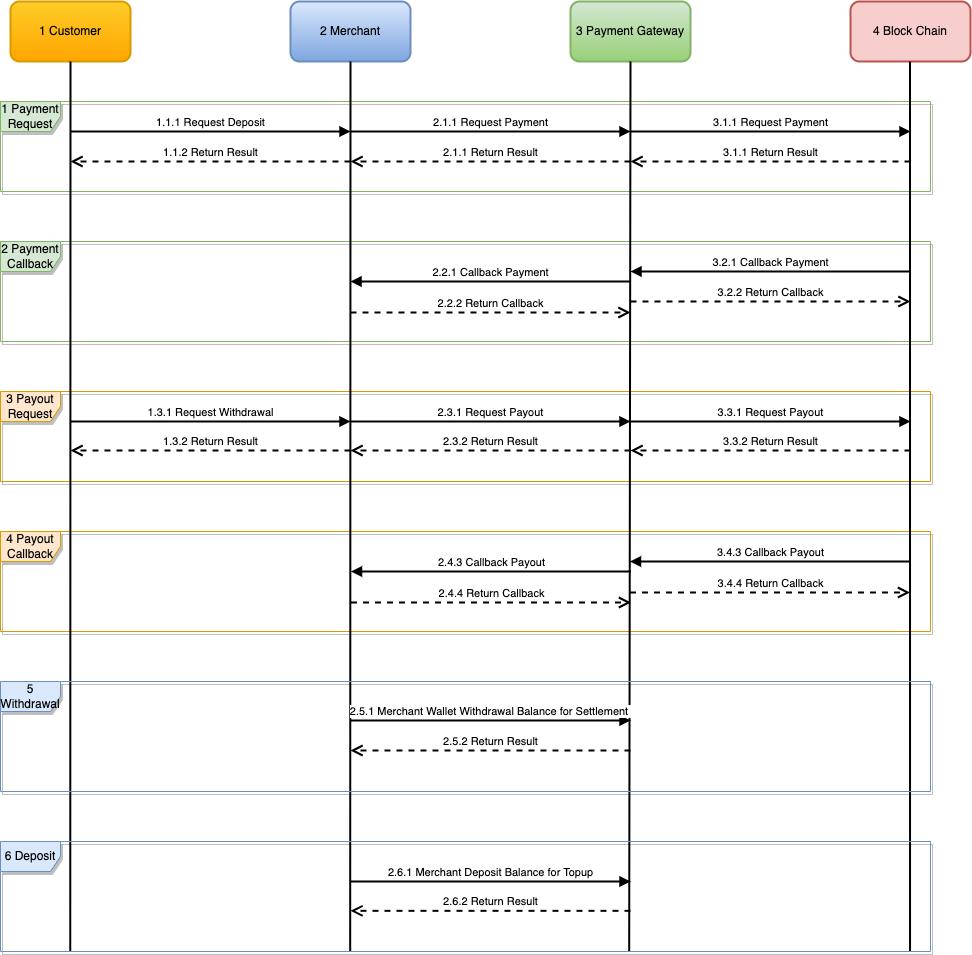
Interface Rules
Protocol Rules
| Transmission Method | To ensure transaction security, HTTPS is used for transmission |
|---|---|
| Submit Method | Submit using POST method |
| Data Format | Submit and return data are in JSON format |
| Character Encoding | Unified use of UTF-8 character encoding |
| Signature Algorithm | SHA1WithRSA |
| Signature Requirements | Signature verification is required for both requesting and receiving data |
| Authorization Requirements | All API operations require authorization to use |
| Integration Logic | First judge the return of the protocol field, then judge the return of the business, and finally judge the transaction status |
HEADER SPECIFICATION
1. Request Content-Type: content-type
set the Header value to JSON format. Example: application/json; charset=UTF-8
2. Request Accept: accept
set the Header value to JSON format. Example: application/json; charset=UTF-8
3. Request URL address: x-ca-resturl
set the Header value to the URL address of the unified order and etc request. Example: https://pay.xpay88.io/pay/unifiedorder
4. Request timestamp: x-ca-timestamp
set the Header value to the millisecond or higher precision timestamp (millisecond/microsecond/nanosecond) of the current request. Example: millisecond timestamp 1586007620038
5. Request random number: x-ca-noncestr
set the Header value to a 32-bit system random number to prevent repeated requests. Example: MD5 (system random number)
6. Request authorization KEY: x-ca-auth
set the Header value to the key obtained by the merchant applying for the API interface. example: fa1f6903307460e099a92afa9431155a
7. Request signature: x-ca-signature
set the Header value to a signature calculated using the SHA1WithRSA signature algorithm, and the signature will be verified by the server. For specific algorithm rules, please refer to the next section
Requested/Returned Signature and Verification Algorithms
The first step, the merchant system API interface will assign the key and the payment platform data public key platform_pubKey , and use the Alipay RSA signature verification toolgenerate the merchant data by itself RSA key pair (private key priKey and public key pubKey , note: non-JAVA applies to 2048 pkcs1s):
key: the key corresponding to the merchant system API
priKey: the RSA private key that signs the merchant system request data
pubKey: the RSA public key that the payment platform verifies the merchant system request data
platform_pubKey: the merchant system to the payment platform Returns the RSA public key for data verification
The second step, spell the string to be signed , the rules are as follows:
string=URI in UTF8 format string URI query parameter in UTF8 format string x-ca-noncestr Header value in UTF8 format string x-ca-timestamp Header value in UTF8 format string POST request JSON data in UTF8 format stringExample: (Note: A blank line means that the URI query parameter of the request is empty)
string=/pay/unifiedorder aa7a97e0dc6b913ea2994522168ff0db 1686952313222 {"amount":1.5,"mchid":100000,"out_trade_no":"17062023055153221","subject":"xpay_payment_test","channel":"xpay_pay_usdt_trc20","return_url":"https://xpay88.io/demo.html","currency":"USDT","client_ip":"3.6.93.106","body":"xpay_payment_test","notify_url":"https://pay.xpay88.io/demo/demonotify","userid":"demopay"}
The third step is to use the SHA1WithRSA signature algorithm to calculate the x-ca-signature signature, as follows:
1. Perform
Base64operation on the signaturestringto obtain thesignvalue
2. Read the merchant private keypriKeyand convert it to the openssl keyprivate key
3. Pass thesignvalue andprivate keyinto the SHA1WithRSA signature algorithm to calculate thesignature
4. PerformBase64operation onsignatureto getx-ca-signaturevalue
Step 4: After the payment platform receives the request from the merchant system, it will verify the request data. If the verification fails, the result of failure is returned; if the verification passes, the corresponding payment business logic is executed and the corresponding result is returned. The payment platform performs the SHA1WithRSA signature algorithm on the Response Data. Examples of the Response Body and Header are as follows:
Response Body:
{"result_code":"OK","result_msg":"SUCCESS","charge":{"channel":"xpay_pay_usdt_trc20","out_trade_no":"17062023022949219","client_ip":"3.6.93.106","amount":"1.5","currency":"USDT","subject":"xpay_payment_test","body":"xpay_payment_test","extparam":[],"credential":{"merch_id":"100000","merch_name":"demo","merch_domain":"https://www.demo.com","out_trade_no":"17062023022949219","trade_no":"0c6002169b3e0e21a2dc646025354fd6","currency":"USDT","network":"TRON","pay_amount":1.5,"pay_channel":"xpay_pay_usdt_trc20","pay_account":"TEwcNd2rdQFp6wBYqvcYL7fbNSrfJtyeZk","fiatrate":"0.000","return_url":"https://pay.xpay88.io/demo.html","time":1686943790,"query_signature":"3f8cd3c4040ccb41ea0bd00756e29482980d90e55047f3d6d76e8dba725c9037","cashier_url":"https://pay.xpay88.io/cashier/payusdt?data=MzE=","merchant_wallet":{"uid":"100000","currency":"USDT","total_limit_credits":"0.00","total_security_deposit_credits":"0.00","total_unsettled_credits":"0.00","total_hold_credits":"0.00","total_commission_credits":"4.18","total_available_credits":"135.41"}}}}

Response Header:
x-ca-timestamp: 1686952314478
x-ca-noncestr: CC6D5CA569F0CEBE99206AAF6B25653C
x-ca-signature: bZ59iGF5u3/53nwqULgFwGl9mzOmKppav4mH/W6buq8AL7OHlrl6YPOb83HYpSCkVYARcz1rn1ahpuhjFXj9wQnLqB1a/23uR7z4pTnyv7HNWpbXarUJ8X1fLMdohEkHnIhPPSnL/gsJoJol8qyQfwLNFxOBE3M2gOKFQJ5/d3TeOqvbTpO6E+GJ51VmNwVEaJ3tVLZ3vvDpEWIhyLe4lJ7KgUMkzXKjW4yIZe/ghWXGzBZtbGea6XjehTAnLFmnqzRdFGCvOTQ2HAdO0IhY4g86roTpdWA73KWPmYYlAs4a4pdivy5tEwzn5KEMs1tt3LGhMzQoW5947OrXy7tAFQ==
Step 5: After the merchant system receives the Response Data, in order to ensure payment security, it is strongly recommended that the merchant verify the Response Data and add our callback IP address to the whitelist, before proceeding with corresponding business processing. The signature verification algorithm is as follows:
Spell the
stringto be checked and signed , the rules are as follows:
string=x-ca-noncestr Header value in UTF8 format string x-ca-timestamp Header value in UTF8 Format string Response Body JSON data in UTF8 format stringThen performBase64operation on thestringto be verified to obtain theverifyvalue, and input the returned Headerx-ca-signaturevalue,verifyvalue , the platform data public keyplatform_pubKey. These three parameters implement the SHA1WithRSA signature verification algorithm.
Error Code
Error Code
| HTTP Status Code | Error Code | Error Type | Error Message | Error Reason | Error Solution |
|---|---|---|---|---|---|
| 404 | 100000 | MissException | Global: Your Required Resource Are Not Found | This exception is thrown when the HTTP 404 status code is used, that is, the corresponding requested resource cannot be found. | Check that the request URL link is correct |
| 400 | 200000 | OrderException | Order does not exist. | Order does not exist | Check if the order number is correct |
| 400 | 200003 | OrderException | Order Error. | wrong order status | Check order status |
| 400 | 400006 | OrderException | Route Payment Error. [No available channels] | Order payment channel unavailable | Check the payment channel parameters and configuration of the order |
| 400 | 400008 | OrderException | Route Payment Error. [No available merchants account.] | Order payment account not available | Check the payment account parameters and configuration of the order |
| 400 | 400008 | OrderException | Route Payment Error. [No available ma code.] | There is no card account available for the order | Check card account status and configuration |
| 400 | 400008 | OrderException | Route Payment Error. [Ma code disconnected, Pls reorder.] | The card account selected by the order suddenly dropped | Please place an order again |
| 400 | 400008 | OrderException | Route Payment Error. [Payment account was misconfigured.] | Order payment account number or card account configuration error | Check the payment account configuration or card account status of the order |
| 400 | 100000 | ParameterException | invalid parameters | The request parameter is invalid or missing | Ensure the legitimacy and integrity of incoming parameters |
| 400 | 400000 | ParameterException | Invalid Request.[ Request header [xxx] Failure.] | Request Header xxx illegal | Ensure the Request Header xxx legal or correctly configured |
| 400 | 400003 | ParameterException | Invalid Request.[ Auth Key No permission or nexistencet.] | The request authorization Key parameter is invalid | Make sure that the request authorization code Key parameter is legal or correctly configured |
| 400 | 400003 | ParameterException | Invalid Request.[ Payment Code Does Not Allowed.] | The request payment channel code parameter is invalid | Ensure that the request payment channel code parameters are legal or correctly configured |
| 400 | 400003 | ParameterException | Invalid Request.[ Payment Code Does Not Allowed.] | The request payment channel code parameter is invalid | Ensure that the request payment channel code parameters are legal or correctly configured |
| 403 | 100003 | ForbiddenException | Invalid Request.[ Trigger Restriction And Flow Control.] | The access frequency of the same IP interface per second exceeds the limit of 100 times | Try again later or contact the platform administrator for assistance |
| 403 | 400003 | ForbiddenException | Invalid Request.[ Request IP not authorized.] | The requesting IP is not authorized and blocked | Make sure the requesting IP is in the authorized list |
| 403 | 400003 | SignatureException | Invalid Request.[ Request Data And Sign Verify Failure.] | Merchant payment request data signature verification failed | Carefully read the interface rules of the API interface documentation, and check the relevant Request Parameters. If you cannot solve the problem, please contact the platform administrator for assistance. |
| 404 | 600000 | UserException | User do not exist. | User does not exist | Check if the user information is correct |
| 400 | 999999 | BaseException | Error .[There may be a problem with the system.] | Generic System Error | Please contact the platform administrator for assistance |
Pay Address
Business Description
Pay address interface, the merchant system first calls this interface to generate a prepaid transaction order in the payment service background
Interface Gateway
URL address: https://pay.xpay88.io/pay/payaddress Note: This interface is a test interface, please ask the sales person for it
Request Parameter
| Parameter Name | Variable Name | Type | Required | Example | Comment |
|---|---|---|---|---|---|
| Merchant UID | mchid | string | True | 100000 | Merchant UID |
| Merchant Member ID | userid | string | True | U123456789 | Merchant Member ID, must be unique |
| Pay Code | channel | string | True | xpay_address_usdt_trc20 | xpay_address_usdt_trc20 xpay_address_trx |
| Currency Code | currency | string | True | USDT | Payment Currency: USDT, TRX |
| Client IP | client_ip | string | True | 127.0.0.1 | Client IP |
| Callback URL | notify_url | string | True | Asynchronous callback address | |
| Return URL | return_url | string | False | Synchronous return address |
Request Data
The following is a sample data of an order request
{
	"mchid": 100000,
	"channel": "xpay_address_usdt_trc20",
	"return_url": "https://xpay88.io/demo.html",
	"currency": "USDT",
	"client_ip": "3.6.93.106",
	"notify_url": "https://pay.xpay88.io/demo/demonotify",
	"userid": "demopay"
}
Return Parameter
| Parameter Name | Variable Name | Type | Required | Example | Comment |
|---|---|---|---|---|---|
| Error Code | result_code | string | True | OK | Result Code. OK: Success, Other: Failure |
| Return Message | result_msg | string | True | SUCCESS | Prompt Information. SUCCESS: success |
| Payload | charge | object | True | Return the payment payload object (please see the specific data below) |
Return Result
{
	"result_code": "OK",
	"result_msg": "SUCCESS",
	"charge": {
		"merch_id": 100000,
		"merch_name": "demo",
		"merch_domain": "https://www.demo.com",
		"userid": "demopay",
		"currency": "USDT",
		"network": "TRON",
		"pay_channel": "xpay_address_usdt_trc20",
		"pay_account": "TEwcNd2rdQFp6wBYqvcYL7fbNSrfJtyeZk",
		"fiatrate": "0.000",
		"return_url": "https://xpay88.io/demo.html",
		"time": 1687148404,
		"query_signature": "851410233da62d1b3fb3494d8d650a75a73af3cb9c8c6c741089f58970a02942",
		"cashier_url": "https://pay.xpay88.io/cashier/addressusdt?data=MQ=="
	}
}
[error] This is the error return information only have error_code 和 error_msg in the returned JSON data
{
	"error_msg": "Invalid Request.[ Request header [authentication] Failure.]",
	"error_code": 400000
}
Unified Order
Business Description
Unified order interface, the merchant system first calls this interface to generate a prepaid transaction order in the payment service background
Interface Gateway
URL address: https://pay.xpay88.io/pay/unifiedorder Note: This interface is a test interface, please ask the sales person for it
Request Parameter
| Parameter Name | Variable Name | Type | Required | Example | Comment |
|---|---|---|---|---|---|
| Merchant UID | mchid | string | True | 100000 | Merchant UID |
| Merchant Member ID | userid | string | True | U123456789 | Merchant Member ID, must be unique |
| Merchant Trade No | out_trade_no | string | True | 17062023022949219 | Merchant Trade No |
| Product Description | subject | string | True | Demo | Product Description |
| Product Info | body | string | True | Demo | Product Info |
| Pay Amount | amount | float | True | 1111.11 | Total pay amount, two digits precision |
| Pay Code | channel | string | True | xpay_payout_usdt_trc20 | (1) Payment: xpay_pay_usdt_trc20 xpay_pay_trx (2) Payout: xpay_payout_usdt_trc20 xpay_payout_trx |
| Extra Data | extparam | string | True | Extra Data:
(1) If it is a payment request, no additional parameters are required (2) If it is a proxy payment request, extparam needs to add crypto/network/address parameters, and the parameter format is json |
|
| Currency Code | currency | string | True | USDT | Payment Currency: USDT, TRX |
| Client IP | client_ip | string | True | 127.0.0.1 | Client IP |
| Callback URL | notify_url | string | True | Asynchronous callback address | |
| Return URL | return_url | string | False | Synchronous return address |
[warning] extparam parameter description
When the channel is a payment request (xpay_payout_usdt_trc20 or xpay_payout_trx), extparam needs to add crypto/network/address parameters:
{"address":"TNcsiLztUSgEfXFBvmwCy2iU5TytccUTjY","crypto":"USDT","network":"TRON"}
Request Data
The following is a sample data of an order request
{
	"extparam": {
		"address": "TNcsiLztUSgEfXFBvmwCy2iU5TytccUTjY",
		"crypto": "USDT",
		"network": "TRON"
	},
	"amount": 1.11,
	"mchid": 100000,
	"out_trade_no": "17062023060452453",
	"subject": "xpay_payout_test",
	"channel": "xpay_payout_usdt_trc20",
	"return_url": "https://xpay88.io/demo.html",
	"currency": "USDT",
	"client_ip": "3.6.93.106",
	"body": "xpay_payout_test",
	"notify_url": "https://pay.xpay88.io/demo/demonotify",
	"userid": "demopay"
}
Return Parameter
| Parameter Name | Variable Name | Type | Required | Example | Comment |
|---|---|---|---|---|---|
| Error Code | result_code | string | True | OK | Result Code. OK: Success, Other: Failure |
| Return Message | result_msg | string | True | SUCCESS | Prompt Information. SUCCESS: success |
| Payload | charge | object | True | Return the payment payload object (please see the specific data below) |
Return Result
[success] This is the successful return information, only when result_code=OK and result_msg= SUCCESS in the returned JSON data can charge
{
	"result_code": "OK",
	"result_msg": "SUCCESS",
	"charge": {
		"out_trade_no": "17062023060452453",
		"trade_no": "3495f19b3b84c5d3db3b61bef94cc681",
		"merchant_wallet": {
			"uid": "100000",
			"currency": "USDT",
			"total_limit_credits": "0.00",
			"total_security_deposit_credits": "0.00",
			"total_unsettled_credits": "2.11",
			"total_hold_credits": "0.00",
			"total_commission_credits": "15.18",
			"total_available_credits": "90.53"
		}
	}
}
[error] This is the error return information only have error_code 和 error_msg in the returned JSON data
{
	"error_msg": "Invalid Request.[ Request header [authentication] Failure.]",
	"error_code": 400000
}
Order Callback
Callback Scenario
After the payment is completed, the payment center will send the relevant payment results and related information to the merchant, and the
merchant needs to receive and process it and return a response. When interacting with notifications in the background, if the payment center
receives a response from the merchant that is not successful or timed out, the payment center considers the notification to fail, and will
periodically re-send the notification within a certain strategy to increase the success rate of the notification as much as possible. However, there
is no guarantee that the notification will ultimately succeed. (The notification frequency is 15/15/30/180/1800/1800/1800/1800/3600 , unit: seconds)
[warning]Note: The same notification may be sent to the merchant system multiple times. Merchant systems must be able to properly handle duplicate notifications. The recommended practice is that when receiving a notification for processing, first check the status of the corresponding business data to determine whether the notification has been processed. Before checking and processing business data, use data locks for concurrency control to avoid data confusion caused by function reentrancy.
[danger] Special reminder: The merchant system must perform signature verification on the content of the order callback, and verify whether the returned order amount is consistent with the order amount on the merchant side, to prevent data leakage from causing "false notifications", cause financial loss.
Interface Gateway
Unify the settings of the parameter notify_url submitted by the order interface . If the link cannot be accessed, your business system
will not be able to receive notifications from the payment center.
Callback and Reply Format
| Parameter Name | Variable Name | Type | Required | Example | Comment |
|---|---|---|---|---|---|
| Return Code | result_code | string | True | OK | Result Code. OK: Success, Other: Failure |
| Return Message | result_msg | string | True | SUCCESS | Prompt Information. SUCCESS: success |
| Payload | charge | object | True | Return the payment payload object (please see the specific data below) |
Callback Data
The following is the data sample of the successful callback
[warning] Note: status is order business status
0-closed
1-waiting
2-success
3-failure
4-paying
5-settled
6-refunded
7-dispute
{
	"result_code": "OK",
	"result_msg": "SUCCESS",
	"charge": {
		"uid": "100000",
		"userid": "demopay",
		"out_trade_no": "17062023060452453",
		"trade_no": "3495f19b3b84c5d3db3b61bef94cc681",
		"in_trade_no": "0744e291231080e3647e6e55b5c3998b",
		"subject": "xpay_payout_test",
		"body": "xpay_payout_test",
		"channel": "xpay_payout_usdt_trc20",
		"paytype": "0",
		"account_id": "TNcsiLztUSgEfXFBvmwCy2iU5TytccUTjY",
		"extra": "{\"address\":\"TNcsiLztUSgEfXFBvmwCy2iU5TytccUTjY\",\"crypto\":\"USDT\",\"network\":\"TRON\"}",
		"currency": "USDT",
		"amount": "1.110",
		"pay_amount": "1.110",
		"amount_paid": "1.110",
		"currency_paid": "USDT",
		"network_paid": "TRON",
		"keyword": "29850e17900284189a42cce0117956f8b445c3e1bd20ef84ec7b79af47d1b33f",
		"urate": "0.000",
		"ufixed_fee": "1.000",
		"user_in": "2.110",
		"client_ip": "3.6.93.106",
		"return_url": "https://xpay88.io/demo.html",
		"notify_url": "https://pay.xpay88.io/demo/demonotify",
		"image_list": null,
		"image_text": null,
		"remark": "{\"errno\":0,\"serial\":\"0744e291231080e3647e6e55b5c3998b\",\"balance\":\"77.62\"}",
		"create_time": "1686953093",
		"update_time": "1686953106",
		"out_status": "1",
		"status": 2,
		"is_status": "0",
		"merchant_wallet": {
			"uid": "100000",
			"currency": "USDT",
			"total_limit_credits": "0.00",
			"total_security_deposit_credits": "0.00",
			"total_unsettled_credits": "0.00",
			"total_hold_credits": "0.00",
			"total_commission_credits": "16.18",
			"total_available_credits": "90.53"
		}
	}
}
Response Data
The following is a sample data for a successful response
{
	"result_code": "OK",
	"result_msg": "SUCCESS"
}
The following is a sample data of a failed response
{
	"result_code": "OK",
	"result_msg": "FAIL"
}
Order Query
Interface Gateway
URL address: https://pay.xpay88.io/pay/orderquery Note: This interface is a test interface, please ask the sales staff for it
Request Parameters
| Parameter Name | Variable Name | Type | Required | Example | Comment |
|---|---|---|---|---|---|
| Merchant UID | mchid | string | True | 100000 | Merchant UID |
| Merchant Trade No | out_trade_no | string | True | 17062023022949219 | Merchant Trade No |
| Pay Code | channel | string | True | xpay_payout_usdt_trc20 | (1) Payment: xpay_pay_usdt_trc20 xpay_pay_trx (2) Payout: xpay_payout_usdt_trc20 xpay_payout_trx |
Request Data
The following is a sample data of an order request
{
	"mchid": 100000,
	"out_trade_no": "17062023045651562",
	"channel": "xpay_payout_usdt_trc20"
}
Return Format
| Parameter Name | Variable Name | Type | Required | Example | Comment |
|---|---|---|---|---|---|
| Return Code | result_code | string | True | OK | Result Code. OK: Success, Other: Failure |
| Return Message | result_msg | string | True | SUCCESS | Prompt Information. SUCCESS: success |
| Payload | charge | object | True | Return the payment payload object (please see the specific data below) |
Return Result
[success] This is the successful return information, only when result_code=OK and result_msg= SUCCESS in the returned JSON data can charge
[warning] Note: status is order business status
0-closed
1-waiting
2-success
3-failure
4-paying
5-settled
6-refunded
7-dispute
{
	"result_code": "OK",
	"result_msg": "SUCCESS",
	"charge": {
		"uid": "100000", # 商户ID
		"userid": "demopay", # 商户会员ID,必须唯一
		"out_trade_no": "17062023060452453", # 商户订单号
		"trade_no": "3495f19b3b84c5d3db3b61bef94cc681", # 三方订单号
		"in_trade_no": "0744e291231080e3647e6e55b5c3998b", # 上游订单号
		"subject": "xpay_payout_test", # 商品描述
		"body": "xpay_payout_test", # 商品信息
		"channel": "xpay_payout_usdt_trc20", # 支付产品
		"paytype": "0", # 代收代付标识,1为代收,0为代付
		"account_id": "TNcsiLztUSgEfXFBvmwCy2iU5TytccUTjY", # 收款地址
		"extra": "{\"address\":\"TNcsiLztUSgEfXFBvmwCy2iU5TytccUTjY\",\"crypto\":\"USDT\",\"network\":\"TRON\"}", # 提单额外参数
		"currency": "USDT", # 提单币种
		"amount": "1.110", # 提单金额
		"pay_amount": "1.110", # 收银支付金额
		"amount_paid": "1.110", # 实际金额
		"currency_paid": "USDT", # 实际币种
		"network_paid": "TRON", # 实际网络
		"keyword": "29850e17900284189a42cce0117956f8b445c3e1bd20ef84ec7b79af47d1b33f", # 关键字-区块链交易ID
		"urate": "0.000", # 佣金比例
		"ufixed_fee": "1.000", # 单笔费用
		"user_in": "2.110", # 商户收入 或 商户费用
		"client_ip": "3.6.93.106", # 会员IP
		"return_url": "https://xpay88.io/demo.html", # 同步回调地址
		"notify_url": "https://pay.xpay88.io/demo/demonotify", # 异步通知地址
		"image_list": null, # 凭证图片
		"image_text": null, # 凭证内容
		"remark": "{\"errno\":0,\"serial\":\"0744e291231080e3647e6e55b5c3998b\",\"balance\":\"77.62\"}", # 备注信息
		"create_time": "1686953093", # 订单创建时间戳
		"update_time": "1686953106", # 订单更新时间戳
		"out_status": "1", # 商户提单状态
		"status": 2, # 三方订单状态
		"is_status": "0", # 通知状态
	}
}
[error] This is the error return information only have error_code 和 error_msg in the returned JSON data
{
	"error_msg": "Invalid Request.[ Request header [authentication] Failure.]",
	"error_code": 400000
}
Balance Query
Interface Gateway
URL address: https://pay.xpay88.io/pay/balancequery Note: This interface is a test interface, please ask the sales staff for it
Request Parameters
| Parameter Name | Variable Name | Type | Required | Example | Comment |
|---|---|---|---|---|---|
| Merchant UID | mchid | string | True | 100000 | Merchant UID |
| Currency Code | currency | string | True | USDT | Payment Currency: USDT, TRX |
Request Data
The following is a sample data of an order request
{
	"mchid": 100000,
	"currency": "USDT"
}
Return Format
| Parameter Name | Variable Name | Type | Required | Example | Comment |
|---|---|---|---|---|---|
| Return Code | result_code | string | True | OK | Result Code. OK: Success, Other: Failure |
| Return Message | result_msg | string | True | SUCCESS | Prompt Information. SUCCESS: success |
| Payload | charge | object | True | Return the payment payload object (please see the specific data below) |
Return Result
[success] This is the successful return information, only when result_code=OK and result_msg= SUCCESS in the returned JSON data can charge
{
	"result_code": "OK",
	"result_msg": "SUCCESS",
	"charge": [
		{
			"uid": "100000",
			"currency": "USDT",
			"limit_credits": "0.000",
			"security_deposit_credits": "0.000",
			"unsettled_credits": "0.000",
			"hold_credits": "0.000",
			"commission_credits": "13.188",
			"available_credits": "96.862"
		}
	]
}
[error] This is the error return information only have error_code 和 error_msg in the returned JSON data
{
	"error_msg": "Invalid Request.[ Request header [authentication] Failure.]",
	"error_code": 400000
}